Pipeline anatomy
A pipeline is an ordered set of stages. Each stage owns exactly one question, and configuration lives on the stage that owns it — never in two places.
The stages
A pipeline runs a document through an ordered set of stages. Each answers one question and owns its own configuration.
Every stage except Initialization can be bypassed. A bypassed stage is skipped for every document; Initialization is locked on.
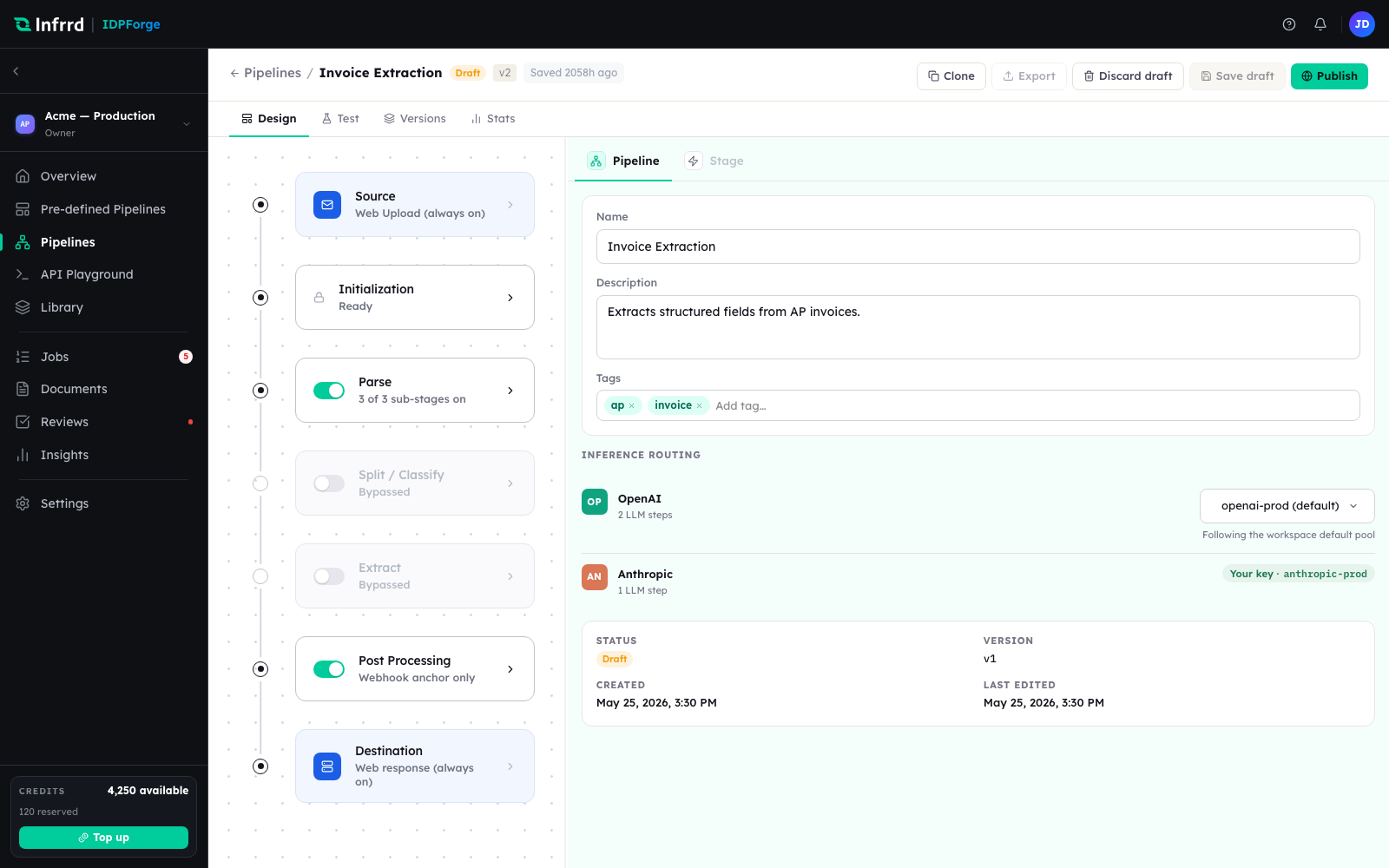
The pipeline builder's Design tab. The column of stage cards is this pipeline's stage order, top to bottom; the right panel shows the pipeline's own settings, or the configuration of whichever stage is selected. Here Split / Classify and Extract are bypassed.
Prefer to watch it built? This walkthrough adds the stages, configures each one, and publishes the pipeline end to end.
A guided, click-through build of a pipeline — stage by stage, from source to destination. It runs in your browser and loads nothing until you press play.
Parse, Split / Classify, and Extract each carry their own sub-stages. The pages below go one level deeper.
Source
Source answers where documents come from and nothing else. All active sources feed the same pipeline, and every job records which source it came from.
- Web Upload — always on. Covers files uploaded in Studio and direct
POST /v1/jobssubmissions over the API. - Google Drive — optional. The source binds a Google Drive connector and picks an input folder; a file dropped into that folder is processed by this pipeline.
Google Drive is the only connector type today. See Connectors & destinations.
A source binds a connector by id. Connectors — and the Google Drive account each one is authorised against — are managed in Settings → Integrations, separately from any one pipeline.
Initialization
Initialization owns what the pipeline accepts and how it is normalized before anything is decided: the allowed file types, the maximum file size, and normalization — pages are rasterized at a target DPI of 150, 200, or 300, and DOCX files are converted to PDF first. Antivirus scanning is always on and cannot be disabled. Initialization is the one stage that cannot be bypassed.
Parse
Parse reads the document's structure before anything is split or extracted. It has three sub-stages — Layout Detection, Language Detection, and OCR — each with its own toggle. See The Parse phase.
Split / Classify
One uploaded file is often many documents. Split cuts a package into document boundaries; Classify assigns each resulting document a class from your taxonomy. Both sub-stages can run independently — split-only, classify-only, or both.
Classification drives routing: routing rules map a class to a schema. A document whose class matches no rule, or matches a rule with no schema bound, is extracted in generic mode.
Extract
Extract reads the fields defined by the schema the document routed to, returning a value and a confidence per field. With no schema resolved it runs in generic mode and returns whatever structure it finds.
Validation runs inside Extract, not as a separate stage. Each field is checked against its schema definition — type, pattern, allowed values, required — and the schema's cross-field rules are evaluated, for example total == subtotal + tax. A field whose confidence is below its threshold is flagged needs_review. The threshold resolves per field, then per schema, then to a default of 0.80; a threshold set on the pipeline's Extract stage overrides all three.
Post Processing
Post Processing sets the output format of the result: JSON, the default, or CSV. XML and Template formats appear in the builder but are not yet available.
Destination
Destination decides where the finished result goes. Web Response is always on: every job's result is retrievable over the API whether or not anything else is configured. A pipeline can also deliver to a Google Drive output folder, written when the job completes. The output format is set on Post Processing, not here.
Human review
Human review is not a stage. Split / Classify and Extract each carry a Send exceptions to Reviews toggle under Human review, off by default. With it on, a low-confidence result becomes a review task in the pipeline's review queue instead of flowing straight through.
| Trigger | Raised by | When |
|---|---|---|
split_boundary | Split / Classify | A split boundary's confidence is below 0.7 |
split_classify | Split / Classify | In fused mode, a segment's classification confidence is below 0.7 |
low_confidence_classify | Split / Classify | A classification lands below the Classify confidence threshold |
low_confidence_extract | Extract | Any field is below its confidence threshold, or a cross-field rule fails |
zero_yield_extract | Extract | Extraction returned nothing at all — raised even with the toggle off |
See Exceptions & human review.
Versions
Pipelines are versioned. Editing a published pipeline creates draft edits against the current version; publishing mints the next version and leaves in-flight jobs on the version they started with. Every job records the exact version it ran, which is what makes a result traceable to the configuration that produced it.