Create a taxonomy
Build a classification taxonomy — outline the class tree, let the class codes derive, bind every leaf to a schema, and publish a version your pipelines can route against.
A taxonomy is the set of document classes a pipeline sorts documents into, and — for a routing taxonomy — the schema each class extracts against. You author it in Library → Taxonomy: draft the class tree, bind each leaf to a schema, and publish a version.
Workspace admins and pipeline builders. Build the schemas the classes route to first, or create them inline while you bind — see Create a schema.
1. Open the taxonomy wizard
In Library, the Taxonomy tab lists your taxonomies with their status, active version, and the pipelines using them. Choose New taxonomy and pick a starting point.
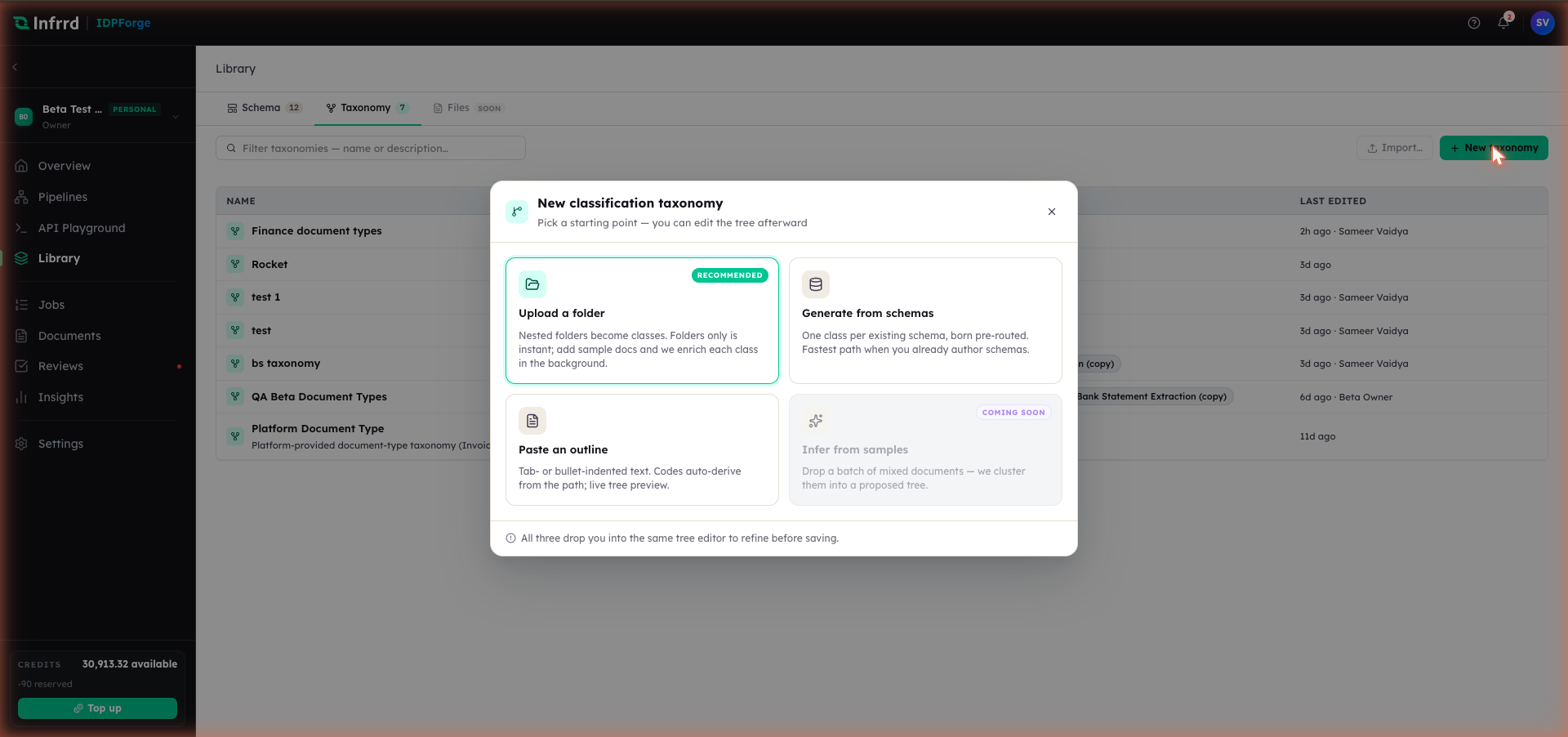
Four ways to start, three of them available today, all landing in the same tree editor. Whichever you pick, the editing, binding, and publishing steps are the same — the difference is only how the first draft of the tree is built.
Each starting point offers a few options before it drops you into the tree editor:
- Upload a folder (recommended) — nested folders become classes. Sample documents placed inside a folder become that class's few-shot anchors and are enriched in the background, so this start can take a few minutes to finish. It offers where class names come from (Folder names, Exact folder names, or Full path), how attached documents are used, and how codes are derived (Auto from path, From name, Slug, or Sequential).
- Generate from schemas — one class per existing schema, born pre-routed. Choose the structure (Under a parent, or Flat — no parent), the version each class tracks (Track latest or Pin current version), and the code source. Only published schemas can be routed to; draft-only schemas are listed but must be published first.
- Paste an outline — tab- or bullet-indented text becomes a tree with a live preview. Choose the indent style (Auto-detect, tabs, or 2/4 spaces), whether to strip or keep list markers, and the code source (including No codes).
- Infer from samples — clusters a batch of mixed documents into a proposed tree. This start is coming soon and is not yet selectable.
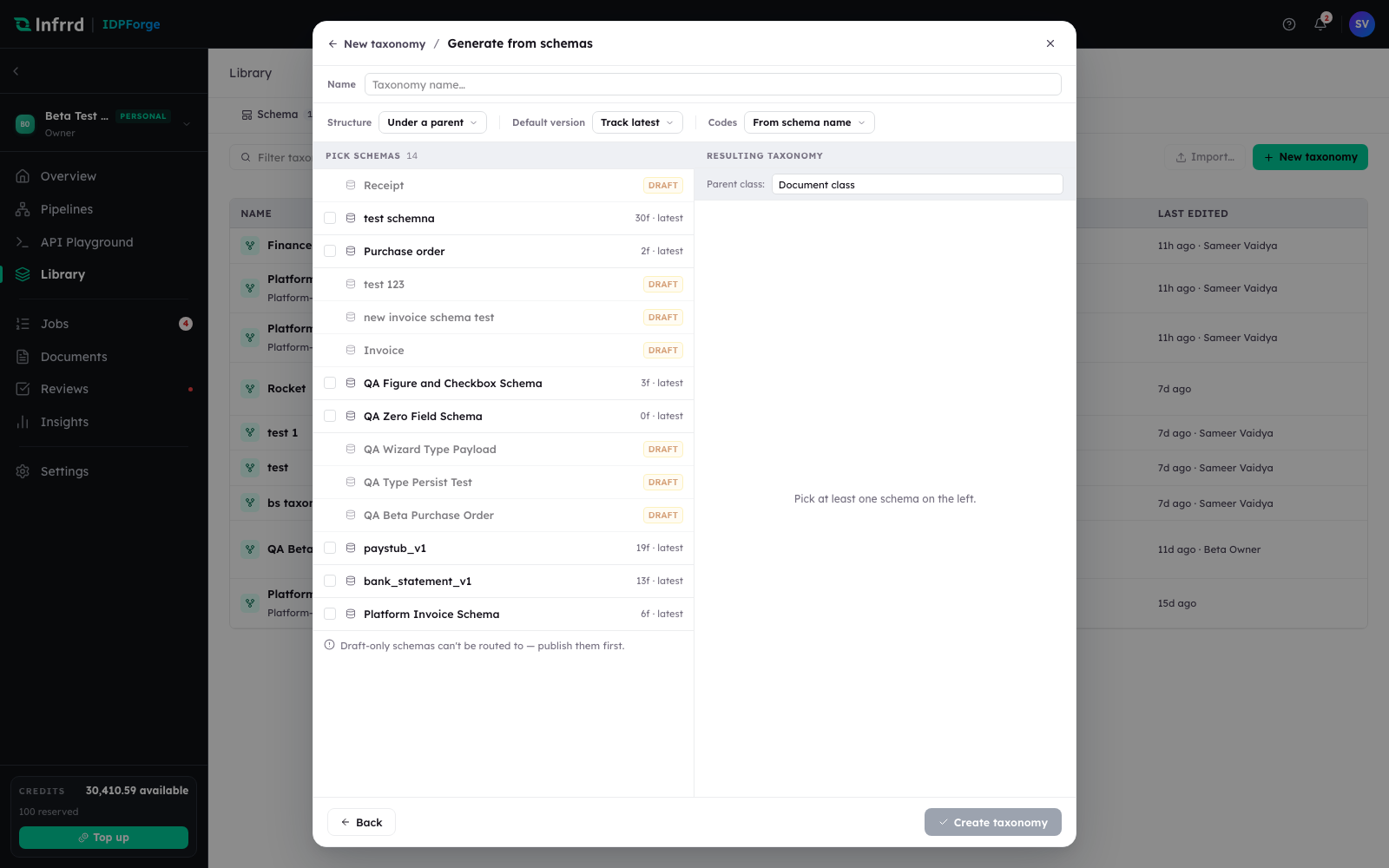
The Generate from schemas start. Structure, default version, and code source are the three options across the top; the schema picker on the left is where each class comes from, and the resulting parent class is named on the right.
The steps below use Paste an outline, the most direct way to see the tree and its codes take shape. Whichever start you pick, the editing, binding, and publishing steps are the same.
2. Draft the class tree from an outline
Give the taxonomy a name and paste an indented outline into the editor — each line is a class, and indentation nests it under its parent. The live preview renders the tree as you type and derives a short code for every class from its path.
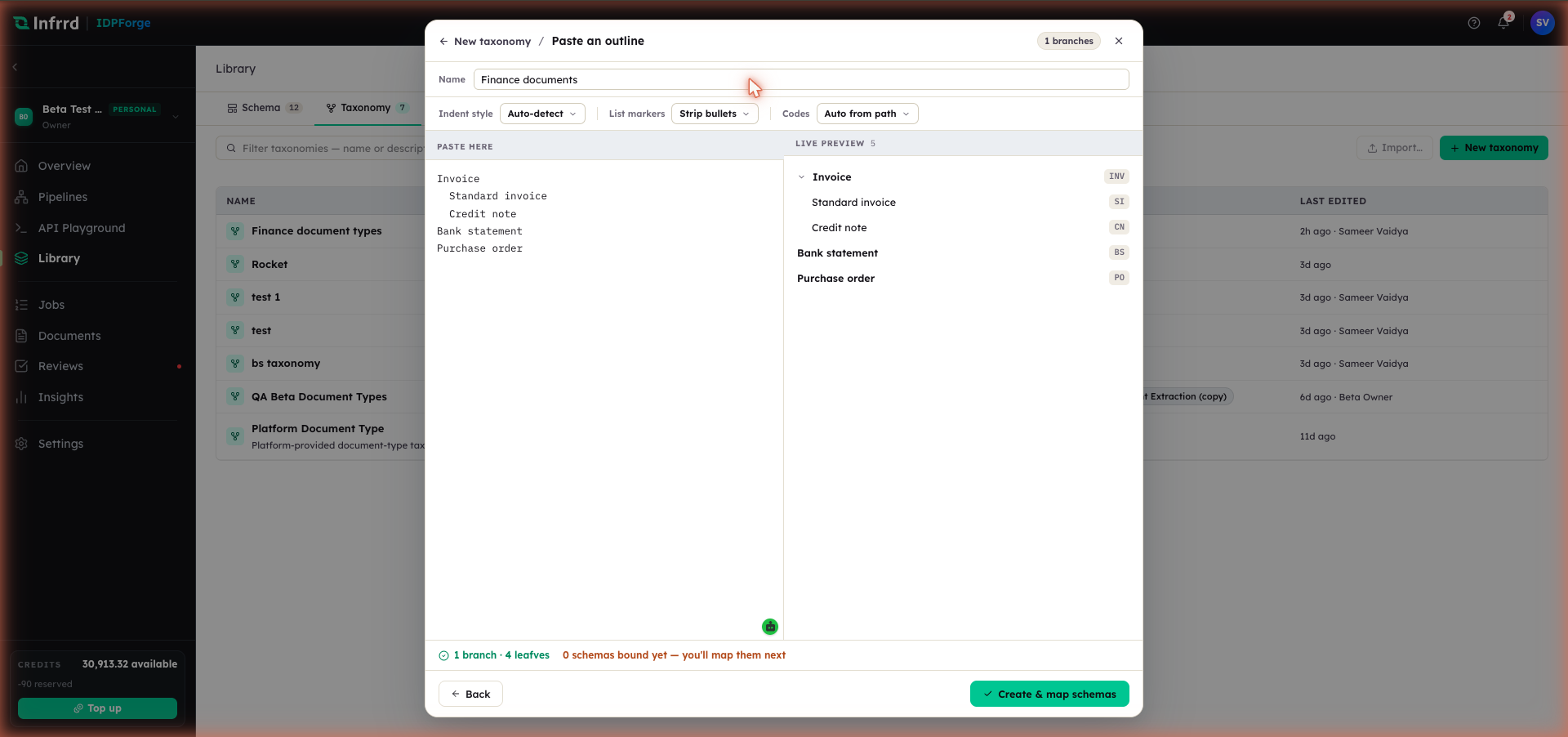
An outline on the left, the class tree on the right. Codes derive from the path — Invoice becomes INV, its child Standard invoice becomes INV.SI. The footer counts the branches and leaves and reminds you that no schemas are bound yet; that comes next.
Create & map schemas saves the draft and opens the tree editor on its routing view.
3. Bind every leaf to a schema
A routing taxonomy sends each document to a schema. The routing view tracks how many classes route to a published schema, so you can see at a glance which leaves still need one.
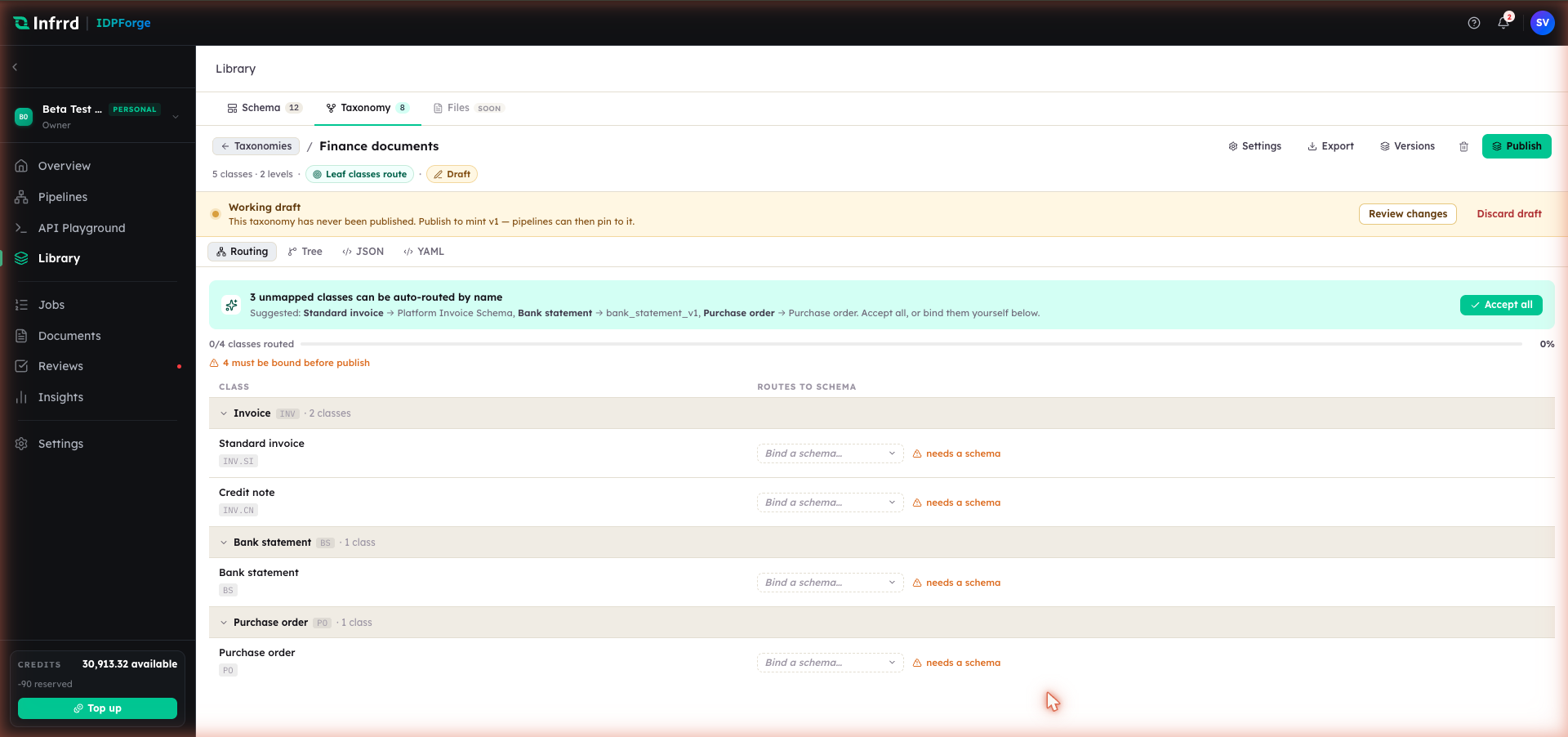
The routing view lists each leaf and the schema it routes to. The progress bar counts routed classes. When IDPForge can match a class to a schema by name, it offers the binding — Accept all takes every suggestion at once, or bind each leaf yourself from the picker.
Bind the remaining leaves from the schema picker on each row — it searches your Library and can create a new schema inline. When every leaf is bound to a published schema, coverage reaches 100% and the view reports that all classes route to a published schema.
4. Refine classes in the tree editor
Switch to the Tree view to edit a class directly. Selecting a class opens its inspector.
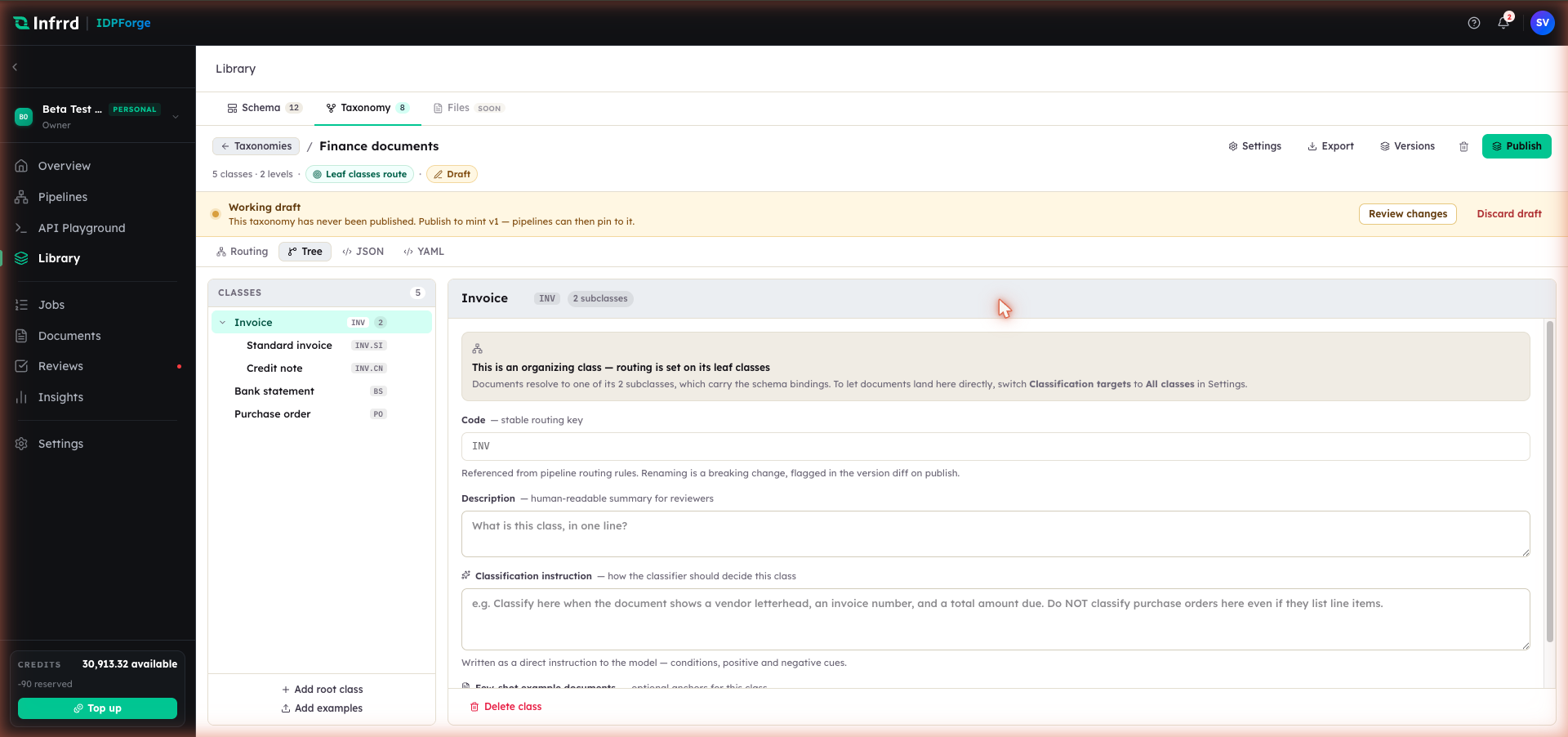
Each class carries a code — the stable routing key pipelines reference — a description, and a classification instruction that tells the classifier how to decide the class, with positive and negative cues. A parent that only organizes its children is marked as such; documents resolve to its leaves, which carry the schema bindings.
The inspector exposes every setting for the selected class:
- Name — the display name; rename it here. Because routing references the code, not the name, renaming is safe for pipelines but is surfaced in the version diff at publish.
- Code — the stable routing key, shown read-only. It is what pipeline rules match against.
- Routes to — the schema this class extracts against, with a version pick. An unbound or unpublished binding is flagged. A class that only organizes its children shows no binding — routing is set on its leaves.
- Description — a human-readable summary for reviewers.
- Classification instruction — how the classifier should decide this class. Write it as a direct instruction with positive and negative cues — "classify here when…", "do not classify here even if…".
- Few-shot example documents — upload documents, or link them from the Library, to anchor tricky decisions.
- Delete class — remove the class from the tree.
Whether documents may land on a parent class at all, rather than only on leaves, is the taxonomy's Classification targets setting — see the edge cases below.
5. Publish a version
Publishing snapshots the tree and its bindings into a numbered version.
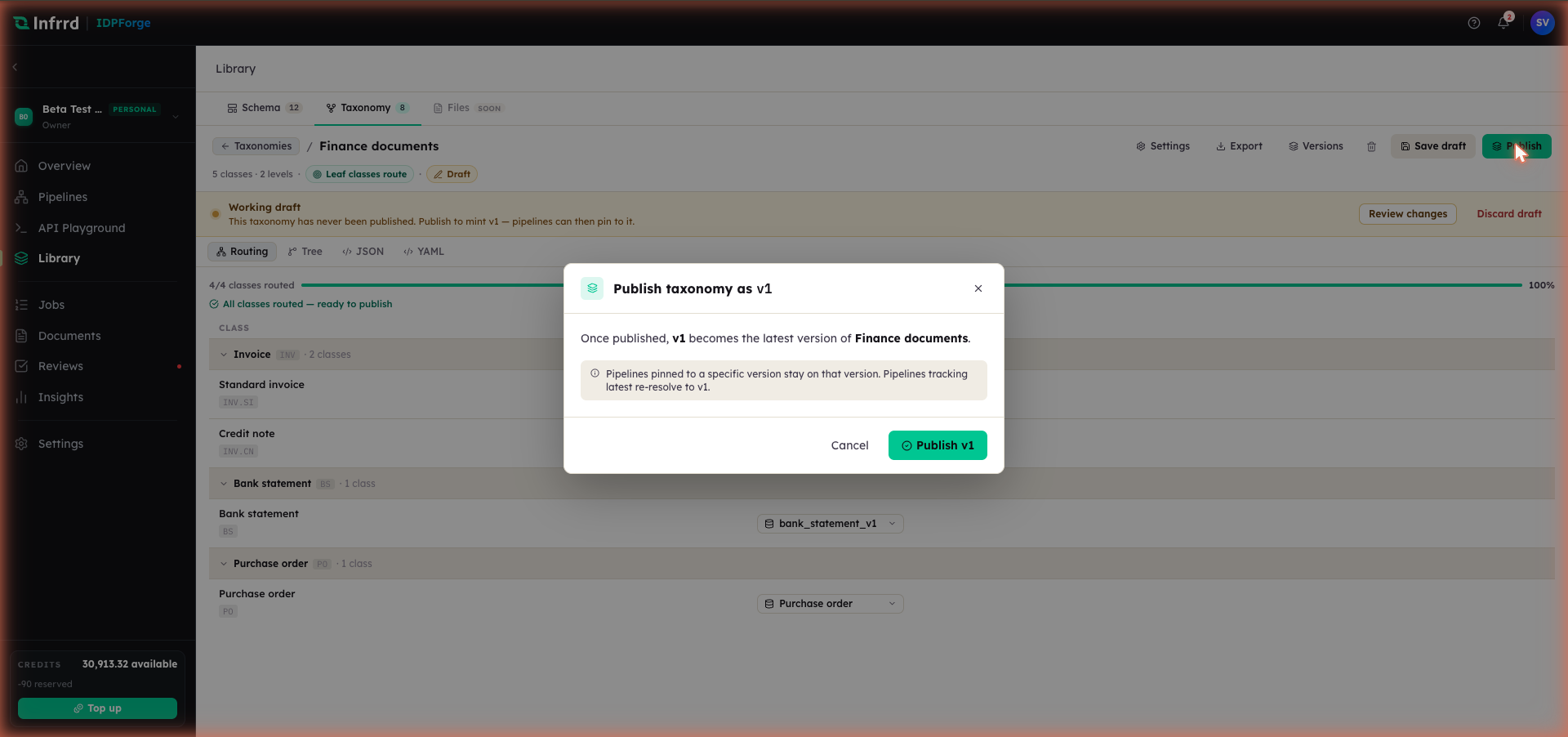
Publishing mints v1. A pipeline pinned to a specific version stays on it; a pipeline tracking the latest version re-resolves to the version you just published.
After publishing, the version badge shows the live version and the working-draft banner clears. Versions in the header lists the published history.
Edge cases
- Leaf classes route; parents organize. By default only leaf classes carry a schema binding and receive documents. To let documents land on a parent class directly, switch Classification targets to All classes in the taxonomy's Settings.
- A class code is a stable key. Pipeline routing rules reference the code, so changing a class's code is a breaking change: it is flagged in the version diff, and the publish dialog warns that pipelines referencing the old code will break until re-pinned.
- Unbound classes do not block publish. The routing view counts them, and a document classified into an unbound class gets generic extraction — free-form JSON instead of validated fields. Bind every leaf before you rely on the taxonomy in production.
- Background enrichment gates publish. Starting points that enrich classes from sample documents do that work in the background, and Publish stays locked while it runs. If enrichment fails, retry it, or stop it and publish the structure as-is.