Generate an API key
Create a scoped API key, copy the one-time secret, and rotate or revoke it later without breaking the callers that use it.
An API key authenticates programmatic calls to IDPForge with the X-API-Key header. Its scopes decide which calls it can make.
Workspace admins. Creating, scoping, and revoking keys is an admin action; a developer can then use the key from code.
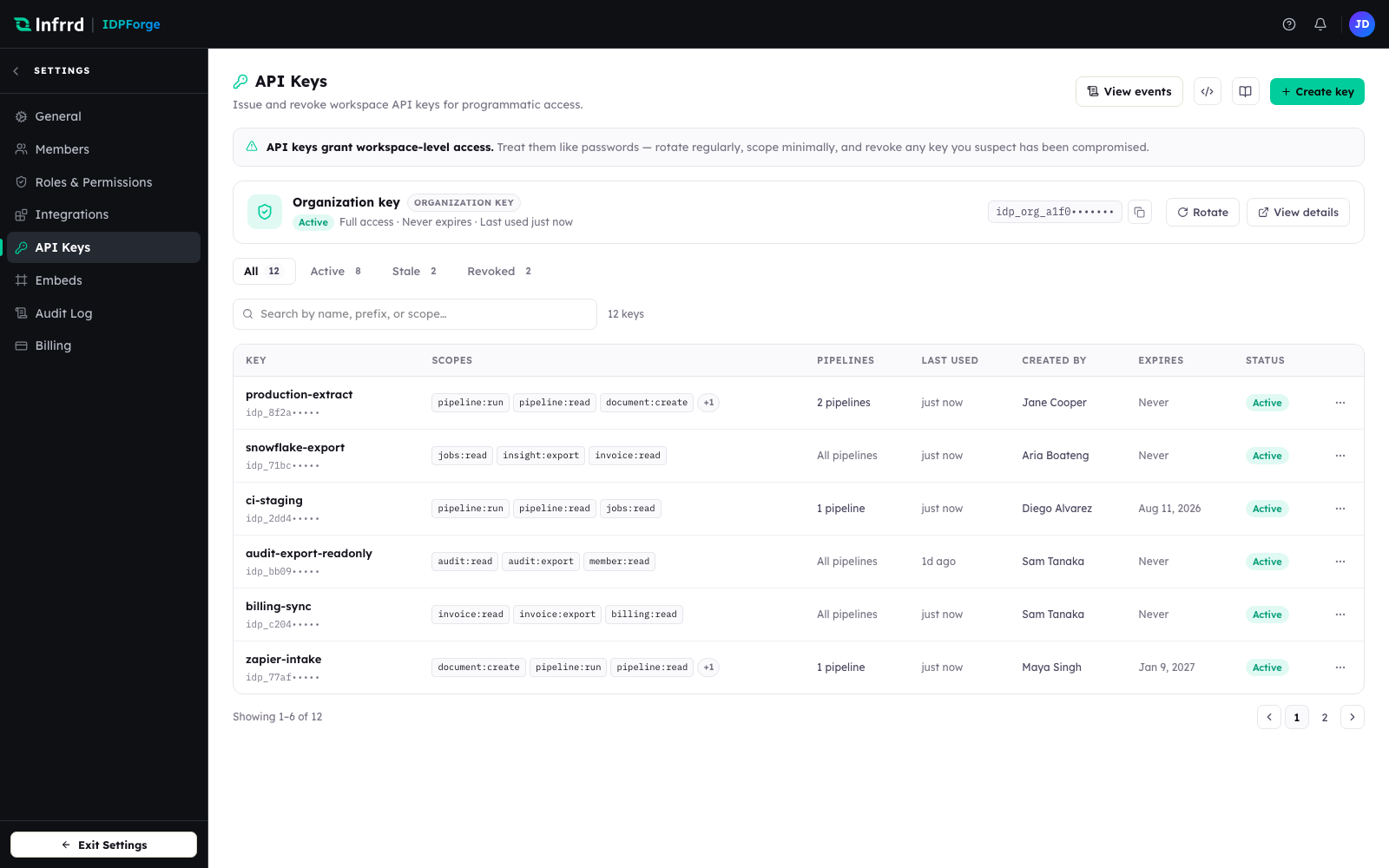
The API keys console. The workspace organization key sits at the top with full access; issued keys are listed below with their scopes, pipeline access, expiry, and status.
1. Open the API keys console
In Settings → API Keys you will find the workspace's keys. The banner is a standing reminder: API keys grant workspace-level access, so treat them like passwords — rotate regularly, scope minimally, and revoke any key you suspect has been compromised.
2. Name the key and set its expiry
Choose Create key. On the Details step, give the key a Key name that says where it runs — production-extract, snowflake-export. The name is how you will recognise the key in the list and in audit events, and it cannot be changed later. Then pick an Expiry: 30 days, 90 days (recommended), 1 year, Never, or a custom date.
3. Choose pipeline access
On the Access step, keep All pipelines (including future), or choose Specific pipelines. A key always belongs to the whole workspace. Picking exactly one pipeline makes it the key's default: a job submitted without a pipeline_id runs on that pipeline. A caller that works with more than one pipeline should always name the one it wants with pipeline_id.
4. Choose scopes
On the Scopes step, grant only the scopes the caller needs — for example jobs:write for a job submitter, jobs:read for a status poller, pipeline:read to list pipelines, and webhook:write to manage webhooks. A read-only poller needs none of the write scopes. You can grant only scopes your own role holds. Choosing Continue creates the key.
5. Copy the one-time secret
The Save step shows the full key, prefixed idpf_live_, once. Copy it into your secret store, tick I've saved this key in a secure place., and choose Done.
IDPForge stores only a hash of the key, never the key itself. If you lose the secret you cannot recover it — rotate the key to get a new one.
6. Rotate or revoke later
A key's row menu, and its detail sheet, hold the lifecycle actions.
- Rotate key issues a new secret. Choose how long the old secret keeps working — Immediately, 1 hour, 24 hours (the default), 7 days, or 30 days — so callers can migrate without downtime. While that overlap is open, Revoke old secret now in the key's details ends it early.
- Edit scopes changes what the key can call; the change applies to the key's next request.
- Revoke stops the key permanently. A revoked key cannot be reactivated.
Edge cases
- The organization key is rotate-only. Every workspace has one full-access organization key — the workspace's root credential. It can be rotated but not revoked or rescoped, and it always rotates immediately, with no overlap window, so update its callers as soon as you rotate it.
- Scopes are enforced on every call. A call that needs a scope the key does not hold is rejected with HTTP 403 (
INSUFFICIENT_SCOPE). When you create a key or edit its scopes, you cannot grant a scope your own role does not hold.