Split
Split finds where one uploaded file stops being one document and starts being the next, and makes each segment its own document that the rest of the pipeline processes on its own.
What Split answers
A single uploaded file is often a stack of documents — an email with three attachments, a scanned batch, a mixed PDF. Split finds the boundaries between those documents and turns each segment into its own child document. Everything after Split — Classify, Extract — runs once per child, not once per file.
Split and Classify share one stage card, because in the common case they run together, but each is an independent sub-stage with its own toggle.
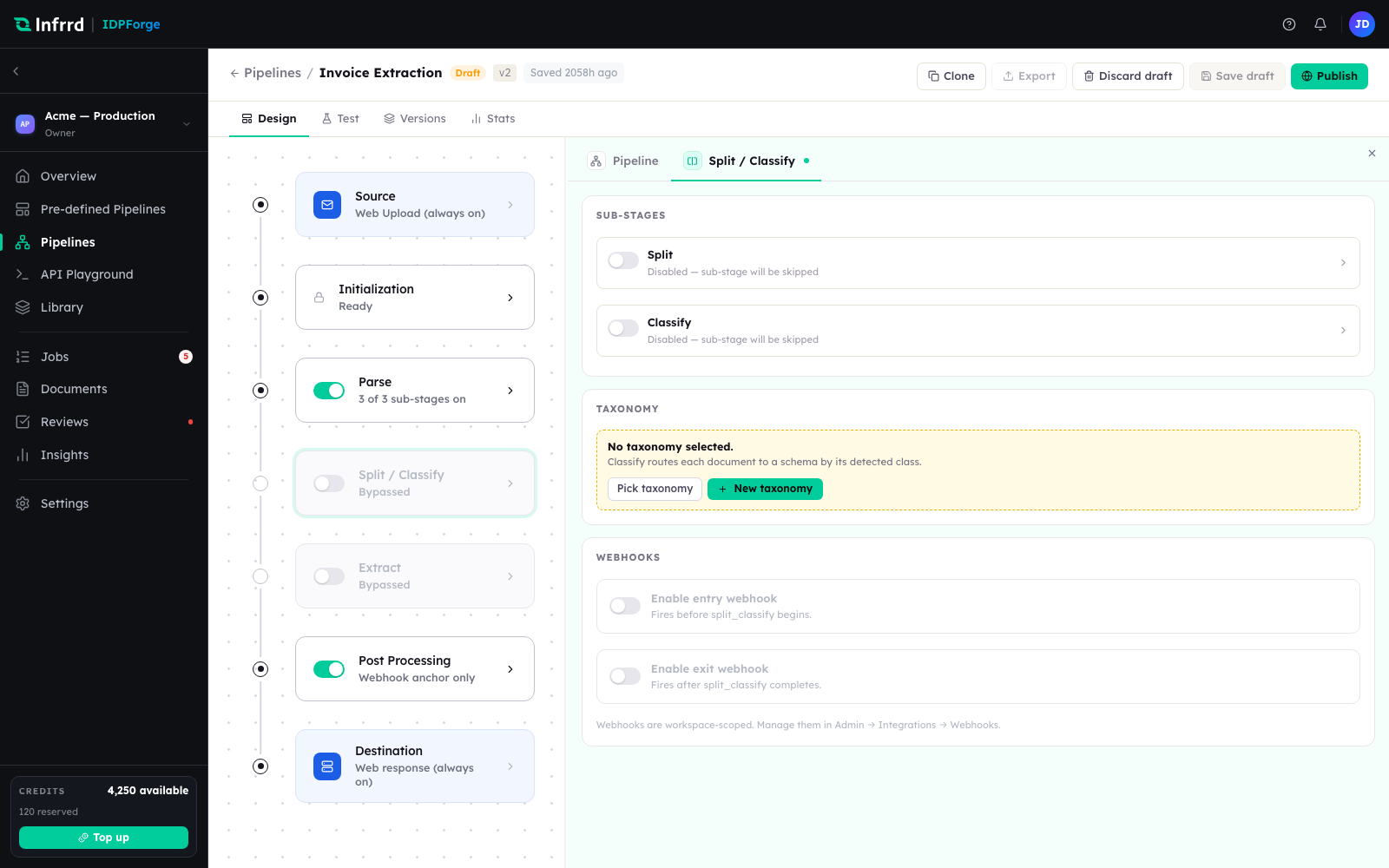
The Split / Classify stage. Split and Classify are separate sub-stages under one card; either can run without the other.
How boundaries are found
Split reads the page images produced by Parse — it is visual, so it does not wait on a text layer, and a document with no readable pages still resolves to a single segment rather than failing. A model returns the segments as page ranges, each carrying a confidence and, informally, a suggested document type. Where a boundary is ambiguous, up to three alternatives are recorded alongside it; the alternatives are informational and never change routing.
The boundaries are validated for coverage — every page belongs to exactly one segment — but validation is advisory: a questionable split is logged and surfaced for correction, never a reason to fail the job. Wrong boundaries are a judgement a person can fix after the fact; a hard failure would throw away the work already done.
Separate and fused
Split and Classify can run as two passes or one.
- Separate — Split finds boundaries, then Classify decides each segment's type in its own pass.
- Fused — a single pass returns boundaries and the type of each segment together. Fused runs up to a page limit, above which the pipeline falls back to the separate path.
Outputs
Split produces one child document per segment, each with its own page range, plus a record of the boundaries and their confidences. Those children are what Classify and Extract operate on; a single-segment file simply carries straight through.
Split confidence is advisory
Low boundary confidence never pauses a job. It is written to the segment and shown for correction, but the pipeline keeps moving. This is the opposite of Classify, where low confidence can hold a document for review — see Classify.
Split on its own
Split and Classify toggle independently, so a pipeline can split without classifying, classify without splitting, or do neither. A split-only pipeline is a first-class configuration, not a workaround.